Search This Blog

Showing posts with label Android. Show all posts

Thursday, October 28, 2021

Multiple flavors of an Android app

Building multiple flavors of an Android app

 https://www.androidauthority.com/building-multiple-flavors-android-app-706436/


Tuesday, October 27, 2020

Connect head unit DHU - android google auto - info and links

 find your google auto app.

i used search in the app to get access to my app.

download latest head unit 

https://developer.android.com/training/cars/testing

in my phone - i get into the app

i click on the "version" 10 times and get into developer mode.

i run on the computer - command line 

adb forward tcp:5277 tcp:5277


on the app menu (right left corner) i "start the head unit server"

on my computer i lunch the app desktop-head-unit.exe

and in the app i click " connect to car" 

and this is it 

good luck

Yaniv Tzanany


sample generic app could be found here

Universal Android Music Player Sample


Monday, September 16, 2019

Android Emulator: Process finished with exit code -1073741819

the solution that works for me was

  1. find your avd folder.(If your using Windows OS, the default path is C:\Users\USER_NAME\ .android\avd\YOUR_VIRTUAL_DEVICE_NAME.avd)
  2. open the file config.ini
  3. find hw.gpu.mode and set it to off (hw.gpu.mode=off)
  4. launch the AVD manager
  5. launch your virtual device.


reinstall emulator + haxm didnt worked for me only the above.

enjoy 
Yaniv Tzanany

Thursday, April 18, 2019

Thursday, February 21, 2019

FCM push via ARC chrome extension

you can send push via ARC  this chrome extension 
you can do it via postman as well (https://medium.com/android-school/test-fcm-notification-with-postman-f91ba08aacc3)


POST to https://fcm.googleapis.com/fcm/send
headers:
content-type  application/json
Authorization   key=[get the key from firbase messageing)

in the body write your json  
e.g. sample 
{
                ""priority"": ""high"",
                ""time_to_live"": 86400,
                ""to"": ""{0}"",
                ""notification"": {
                                                              
                        },
                ""data"": {
                            ""title"": ""{1}"",
                            ""body"": ""{2}""  
                        ""basic"":""{3}"",
                        ""firstname"":""{4}"",
                        ""lastname"":""{5}""
                        }
            }"


Tuesday, February 13, 2018

Pushy - Lightning-Fast & Highly-Reliable Push Notifications

sometimes you dont want or cant use GCM for pushes

e.g for china user  no GCM , or when you cant have Google play store - e.g. in the car .

so the alternative is jPush or Pushy  - maybe there are more...

pushy looks easy and well documented

 Pushy - Lightning-Fast & Highly-Reliable Push Notifications:

nice article about non GCM could be found here
https://mobikul.com/android-push-notification-in-china/


enjoy

Yaniv Tzanany

Monday, January 22, 2018

Android studio Failed to load class dynamically

after moving to Android Studio we noticed that we get failed to load class dynamically.
via such code below:

ClassLoader cl = getClassLoader();
Class classToInvestigate = df.loadClass(className, cl);

in out case we needed to remove (disbaled) the instant run , and in the class name 
we needed to change from string ("com.xx.yy.teston") to getCanonicalName()
e.g. com.xx.yy.teston.class.getCanonicalName()

here how i disabled the instant run 
i hope you will find it useful. 
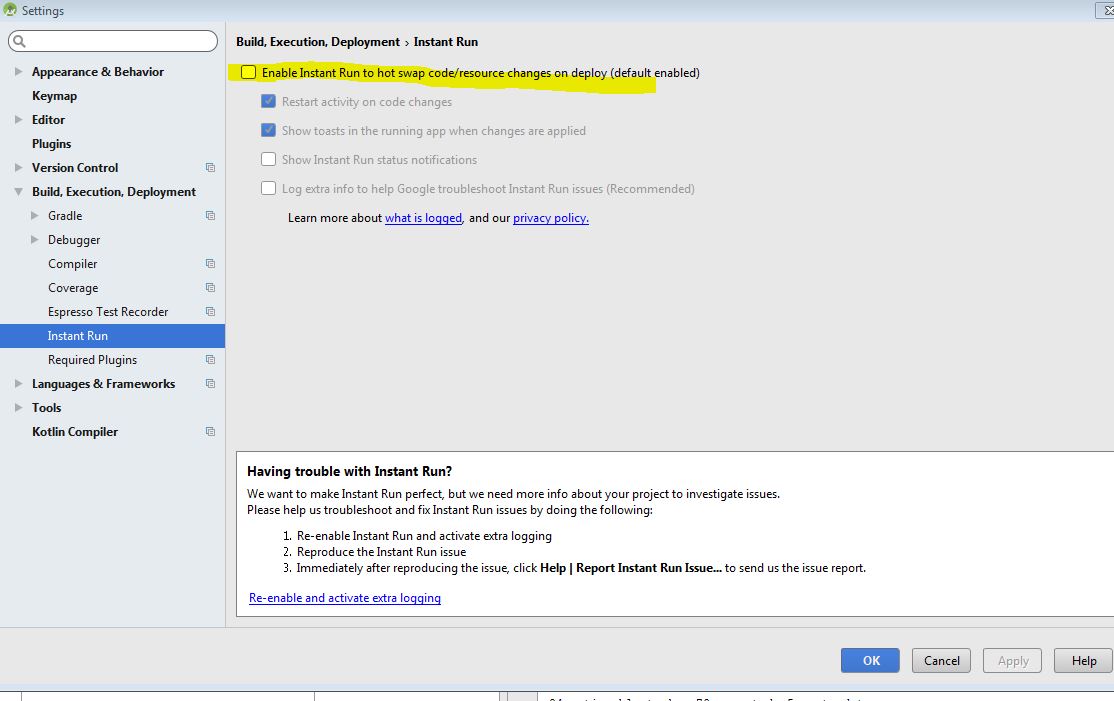

also some info you can see here 
https://stackoverflow.com/questions/36881299/java-lang-classnotfoundexception-after-android-studio-update
enjoy 
Yaniv Tzanany


Saturday, November 25, 2017

View Settings/secure/global data from Android

i was looking for a way to look into the settings.db or other secure db that exist in android , on non rooted device.
i find out this command to View the data :

adb shell content
e.g. - to see all global settings
adb shell content query --uri content://settings/global

adb shell content query --uri content://settings/system
adb shell content query --uri content://settings/secure


there is also a tool - have a look at  adb-export

enjoy
Yaniv Tzanany